aibleton
Sequencing Ableton Move from AIbleton
AIbleton can write clips that play on an Ableton Move over USB-C — Live acts as the MIDI hub, Move acts as an external sound module playing its own instruments (Drift, Drum Sampler, …).
Chinese version: ableton-move.zh-CN.md
Requirements
| Side | Requirement |
|---|---|
| Move | Firmware ≥ 1.5, Standalone Mode (not Control Live Mode), connected via USB-C |
| Live | 12.x with AIbleton ≥ 0.9.3 |
| macOS | If “Ableton Move” doesn’t show up as a MIDI port, see macOS quirk below |
Firmware 1.5 added “Exchange MIDI with USB Hosts” — that’s what lets a DAW send MIDI to Move’s tracks over USB-C. Check Setup → About on the unit; update via Move Manager if needed.
One-time setup
- Connect Move via USB-C, power it on in Standalone Mode.
- Live → Settings → Link, Tempo & MIDI → for the Ableton Move output port, enable Track (and Sync if you want Live to send MIDI clock).
- In the chat, ask e.g. “create a Move track on channel 1” — AIbleton runs
create_move_track, which creates a MIDI track namedMove Ch 1. - Manual step (once per Set): the Extensions SDK cannot set output routing, so set that track’s Output Type → Ableton Move, Output Channel → 1 yourself. Live remembers it in the Set from then on.
- On Move, pick the receiving track: hold Shift + press a track button → set MIDI In to the same channel (or Auto, which accepts every channel not explicitly assigned to another track).
Done — ask AIbleton to “write a 4-bar house groove into the Move track” and it lands on Move’s instruments.
What works / what doesn’t
| Works | Doesn’t work |
|---|---|
| Notes, velocity, poly aftertouch | MIDI CC (Move ignores it — no knob automation over MIDI) |
| 4 tracks = 4 MIDI channels | Reading Move’s state back into Live |
| MIDI clock sync (enable Sync on the port) | Realtime streaming from AIbleton (clips are played by Live’s engine) |
| Ableton Link over WiFi as clock alternative | Controlling Move’s UI/session remotely |
Notes on note numbers:
- Move drum pads follow the Drum Rack layout from note 36 (C1) up.
- Melodic tracks respond to normal pitched notes; per-track MIDI In channels are set on the hardware (Shift + track button).
macOS quirk
If the unit once ran firmware ≤ 1.4.1 while connected to this Mac, macOS keeps a stale MIDI device entry and the new port configuration never appears:
- Disconnect Move.
- Open Audio MIDI Setup → MIDI Studio, delete the Ableton Move device.
- Reconnect Move.
Typical session
you:  Create a Move track on channel 1.
AI:   [create_move_track] → The track is ready. Set Output Type to Ableton Move
      and Output Channel to 1 (only once per Set).
you:  Write a 4-bar house drum groove.
AI:   [write_session_clip] → Written. Launch the clip to hear it on Move.
File transfer over WiFi (pairing)
AIbleton also talks to the Move Manager’s stock HTTP API — no USB cable, no SSH:
| Tool | What it does |
|---|---|
move_status |
Reachability, pairing state, firmware version |
move_pair |
Pairing handshake (6-digit code on the Move’s display) |
move_list_sets |
List Sets on the device |
move_list_files |
Browse folders/files (Samples, Recordings, …) |
move_upload_sample |
Push a local audio file to the Move (default: Samples) |
move_download_set |
Pull a Set (.ablbundle) into the User Library’s AIbleton folder |
move_analyze_set |
Pull a Set and analyze it: key detection, per-track roles/note stats/ranges, mixer levels, device presets, sample list with durations — the same engine as analyze_song, plus Move extras |
move_analyze_set parses the .ablbundle (a zip holding Song.abl — JSON,
Ableton’s song/1.8.x schema — plus the WAVs). Move Sets have no arrangement
view, so all clips are reported as session clips. Typical questions it answers
out of the box include: “What key and tempo is this Set in?”, “How many notes
does the bass track play, and what is its note range?”, and “Which samples were
recorded and which come from the core library?” It is also the natural first
step before recreating or extending a Move Set in Live.
Pairing is a one-time handshake — the token is persisted by the extension:
you:  Pair my Move.
AI:   [move_pair] → A 6-digit pairing code is shown on Move's display. Tell me
      the code.
you:  438217
AI:   [move_pair code=438217] → Paired successfully.
you:  Generate a 120 BPM dusty kick, then send it to Move.
AI:   [generate_audio] → [move_upload_sample] → kick.wav is in Move's Samples
      folder and can be loaded onto a drum pad.
Sample upload example
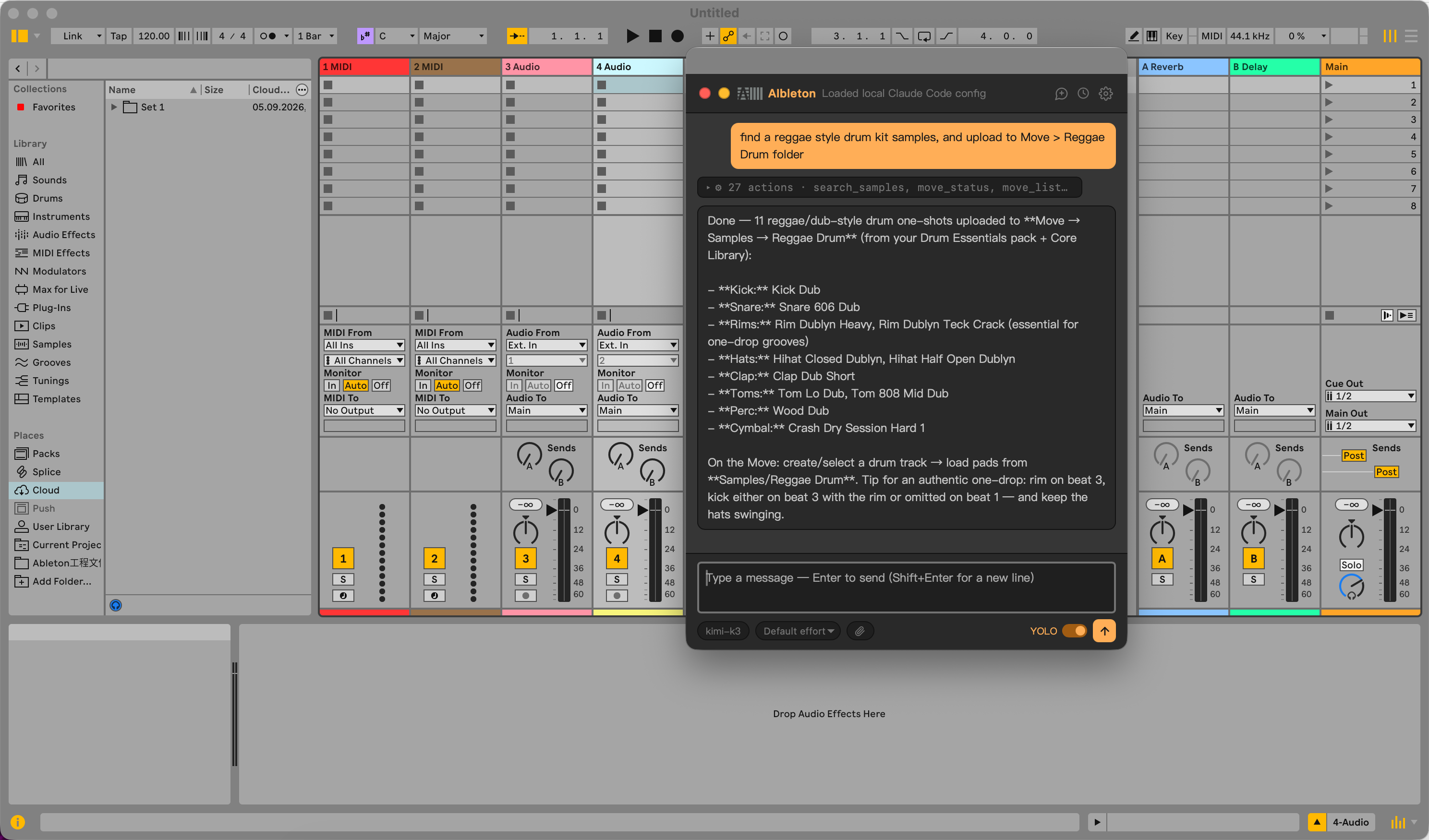
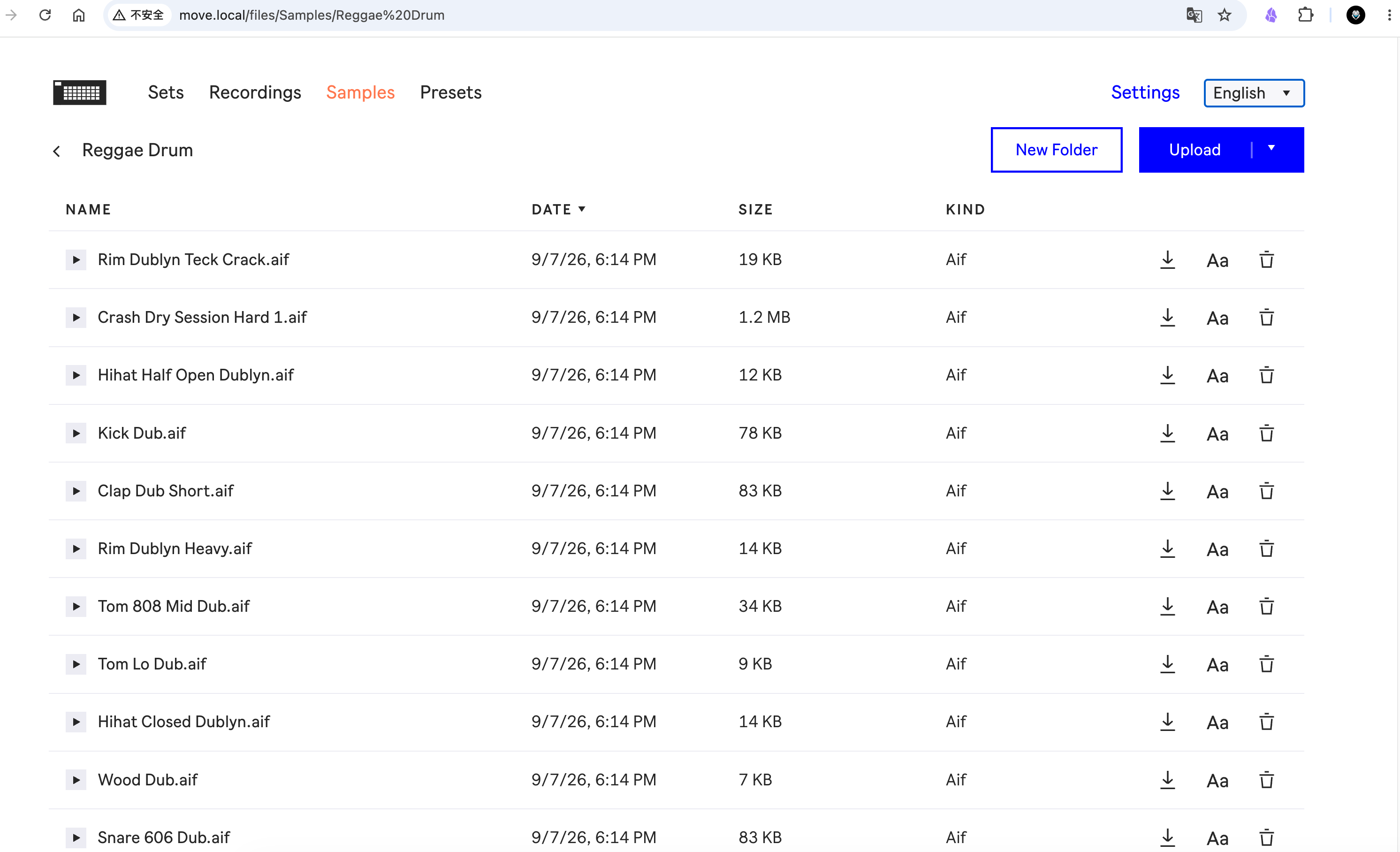
AIbleton can find a sample in Live’s library and upload it to Move over WiFi. The screenshots show the upload in AIbleton and the resulting files on Move.
| Upload from AIbleton | Samples on Move |
|---|---|
 |
 |
Notes:
- Move and computer must be on the same WiFi; the host defaults to
move.local(pass another hostname/IP tomove_pairif renamed). - Uploads and downloads ask for confirmation in the chat UI (like any state-changing tool); pairing/listing run straight through.
- If calls start failing with “Not paired”, the token has expired — pair again.