
AIbleton
An AI music production agent inside Ableton Live.
Create, understand, analyze, arrange, edit, and refine music directly inside Live.
Chat · Create · Analyze · Reason · Arrange · Edit · Control
Use Codex, Claude, Gemini, or other compatible AI models directly in your music production workflow.
English · 中文



---
## Download
**Current version: v0.9.11** — [view all releases](https://github.com/freddyzhangxu/aibleton/releases).
| File | What it is |
|---|---|
| [Download AIbleton-0.9.11.ablx](https://github.com/freddyzhangxu/aibleton/releases/download/v0.9.11/AIbleton-0.9.11.ablx) | The Live extension — **required**. Install it from **Live → Settings → Extensions**. |
| [Download AIbletonBar for macOS](https://github.com/freddyzhangxu/aibleton/releases/latest/download/AIbletonBar-macOS.zip) | Optional floating sidebar. **No update needed** — it only loads the UI served by the extension, so keeping the `.ablx` above current is enough. ⚠️ **First launch is blocked by macOS** (ad-hoc signed, not notarized): run `xattr -cr /Applications/AIbletonBar.app` once in Terminal — or right-click the app → **Open** → **Open**. After that it launches normally. |
| [Download AIbletonBar for Windows](https://github.com/freddyzhangxu/aibleton/releases/latest/download/AIbletonBar-Windows.zip) | Optional floating sidebar. **No update needed** — updating the `.ablx` above is enough. |
## What is AIbleton?
Most AI music tools can generate music or give you advice.
**AIbleton is an AI music production agent that can create, understand, analyze, arrange, edit, and refine music directly inside Ableton Live.**
Ask it to create something new, improve what you already have, analyze your arrangement, or make changes to your Live Set.
For example:
> "Create a 4-bar bassline in A minor."
> "Make the bass less busy."
> "Analyze the arrangement and tell me what's missing."
> "Add an Auto Filter to the synth and sweep the cutoff."
> "Create a drum groove inspired by a classic 909 pattern."
The agent can inspect your Live Set, understand musical context, reason about your music, and perform changes directly in Live.
## Screenshots
| AI agent dialog inside Live | AIbletonBar floating sidebar |
|:---:|:---:|
| 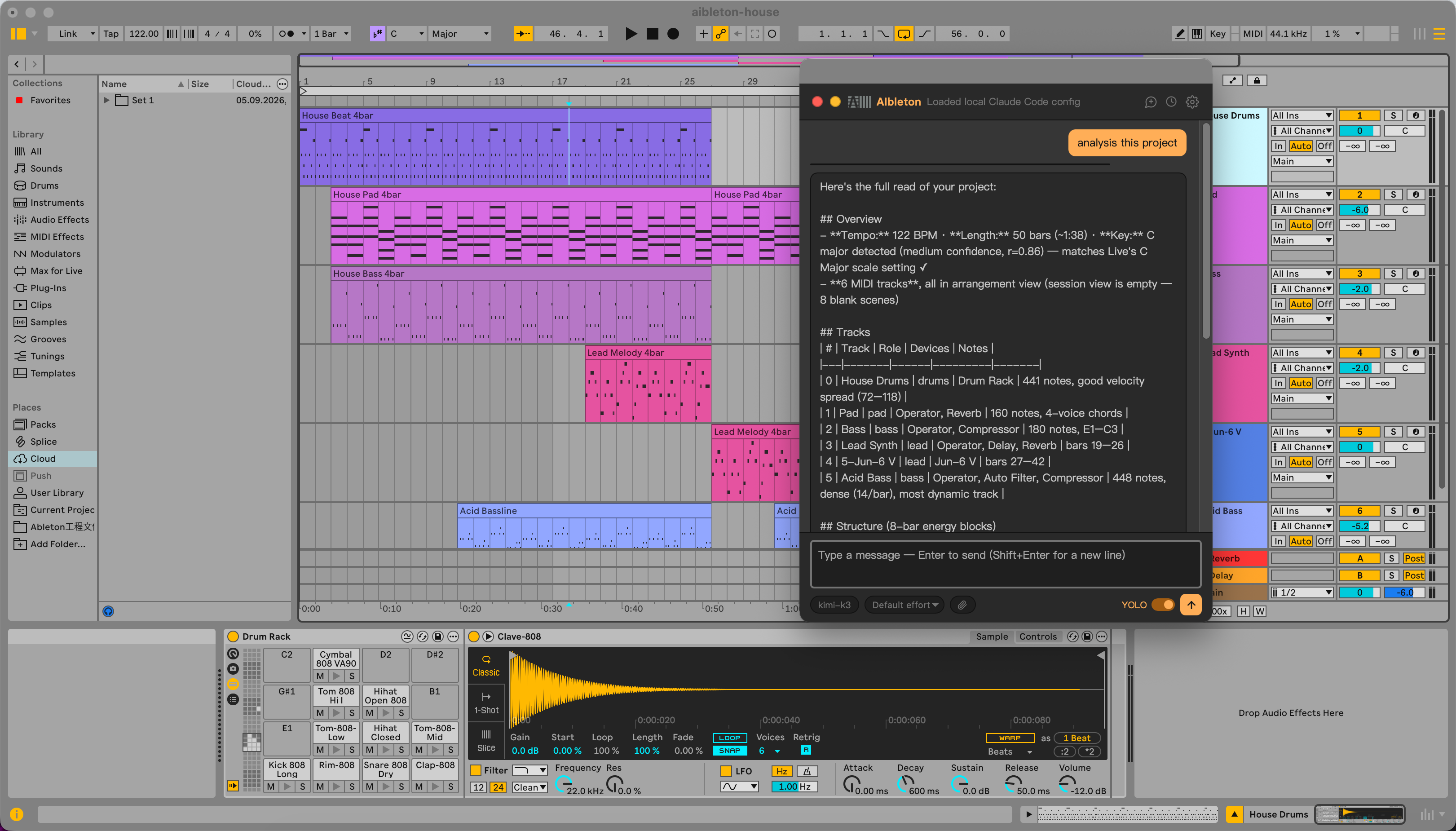 | 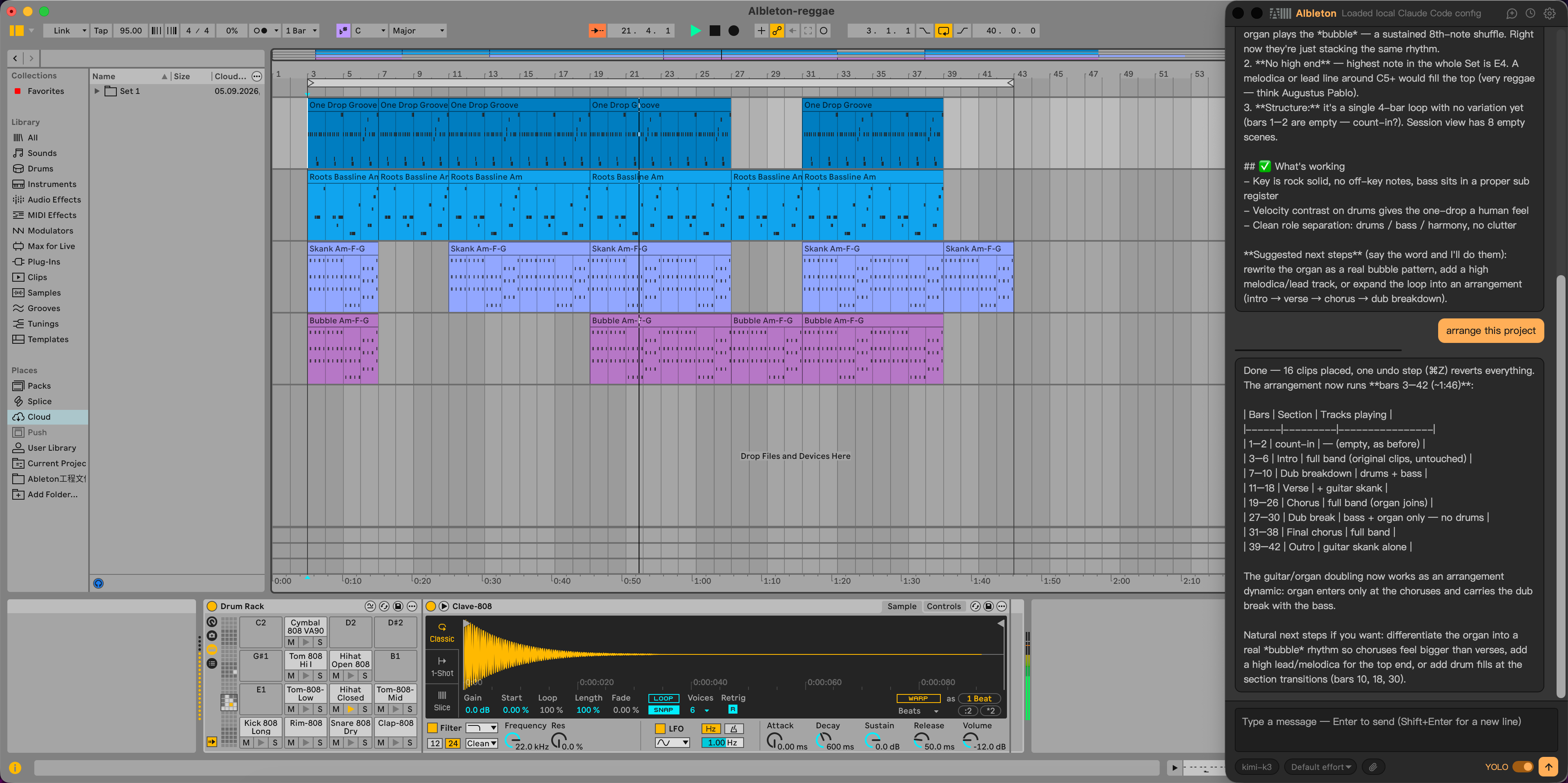 |
| AI finds samples and pushes them to Move over Wi-Fi | Samples on the device |
|:---:|:---:|
| 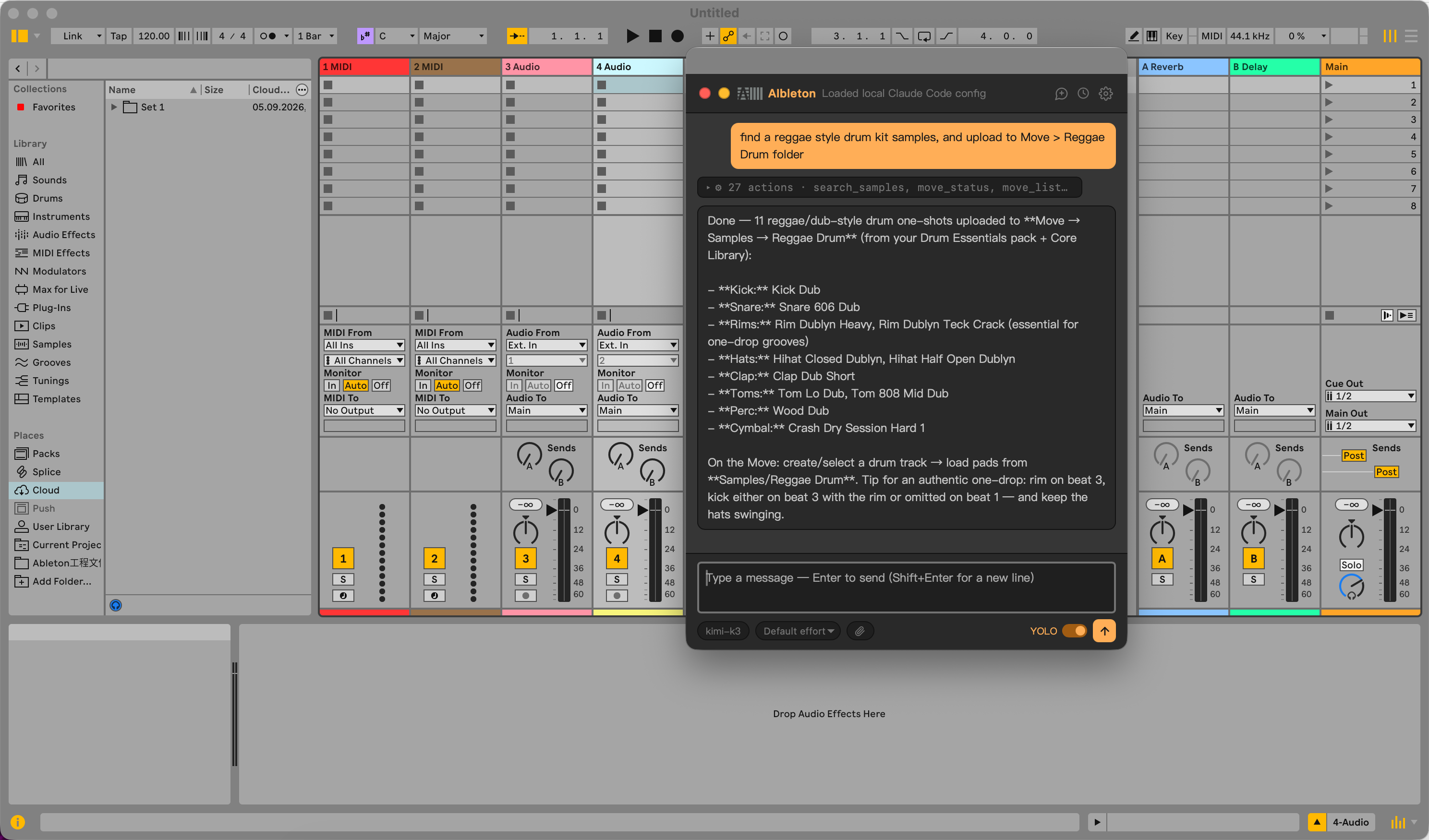 | 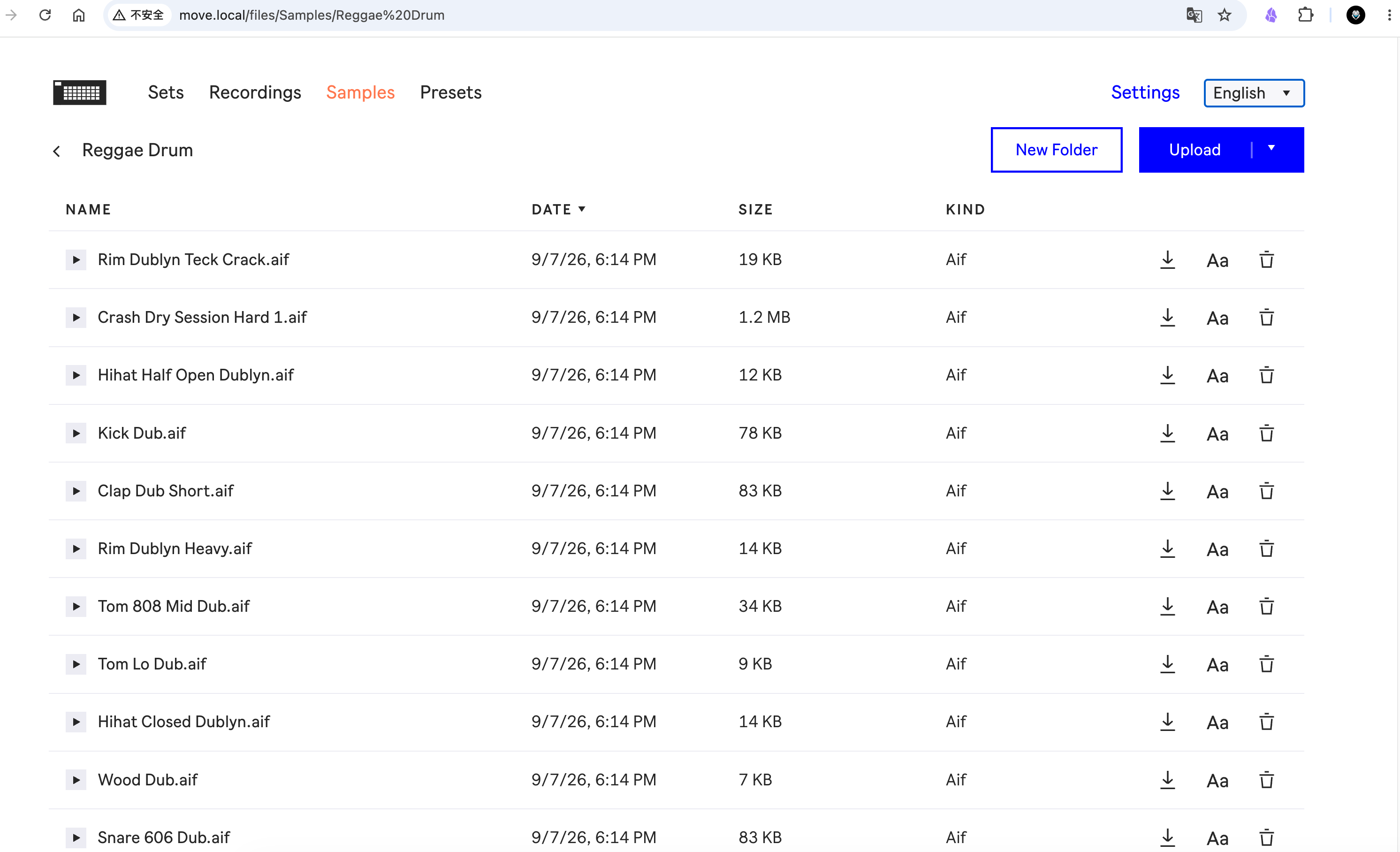 |
## Core Capabilities
### Create
- Generate MIDI clips and musical patterns
- Create drum grooves and instrument parts
- Generate audio with supported AI providers
- Load drum kits and instruments
- Turn natural-language ideas into musical content
### Understand
- Analyze the current Live Set
- Inspect tracks, clips, MIDI, devices, and parameters
- Understand key, tempo, track roles, and musical context
- Analyze arrangement structure and sections
- Analyze audio characteristics
### Reason
- Extract structured musical features
- Understand relationships between tracks and sections
- Compare section contrast and similarity
- Analyze musical roles and arrangement arcs
- Produce evidence-backed musical observations
- Use reference tracks for musical comparison
### Arrange
- Create and modify arrangements
- Work with musical sections
- Generate and edit clips
- Make section-aware changes
- Plan changes before executing them
### Edit & Control
- Create and manage tracks and scenes
- Insert and control devices
- Change mixer and device parameters
- Make batch sound-design changes
- Control Ableton Live directly from the agent
### Refine
AIbleton can use audio analysis as part of an iterative production loop:
```text
Generate
↓
Import
↓
Analyze
↓
Evaluate
↓
Refine
↓
Analyze again
```
This allows generated music to be evaluated against measurable goals and refined through multiple iterations.
### Search & Remember
- Search local sample libraries
- Search the web when enabled
- Remember artist preferences and musical context
- Reuse reference and analysis information
### Ableton Move
For setup, routing, pairing, and troubleshooting, see the [Ableton Move guide](docs/ableton-move.md).
- Analyze Move Sets
- Transfer samples
- Work with Move MIDI and projects
- Upload Live samples to Move
- Connect Move to the AI-powered production workflow
## How It Works
```text
User Intent
↓
AI Agent
↓
Understand Live Set
↓
Music Intelligence
├─ Musical Features
├─ Relationships
├─ Analysis
└─ Reasoning
↓
Plan
↓
Creative Actions
↓
Ableton Live
↓
Analyze & Verify
↓
Refine when needed
```
AIbleton separates the **AI model** from the **music-production runtime**, allowing different AI providers to work with the same Live integration and production tools.
## Music Intelligence
AIbleton is built around a structured understanding of the musical state of a Live Set.
```text
Live Set
↓
Music State
↓
Musical Features
↓
Relationships
↓
Reasoning
↓
Creative Actions
↓
Agent
↓
Live
```
This allows the agent to work with more than individual commands.
It can reason about **musical context, structure, relationships, intent, and measurable results** before and after making changes.
## Agent Runtime
AIbleton uses an agent runtime to coordinate:
- Natural-language intent
- Planning and execution
- Tool calls
- Goal tracking
- Verification
- Retry and replanning
- Musical analysis
- Audio feedback
- Provider-independent model access
The goal is not simply to generate a response, but to **complete a music-production task and verify the result inside Ableton Live.**
## Installation
### Requirements
- Ableton Live 12.4.5+
- Ableton Extensions SDK support
- An AI provider
Download the latest `.ablx` from the [Releases page](https://github.com/freddyzhangxu/aibleton/releases) and install it from:
**Ableton Live → Settings → Extensions**
AIbleton also provides an optional **AIbletonBar** floating interface for macOS and Windows.
## Development
```bash
git clone https://github.com/freddyzhangxu/aibleton.git
cd aibleton/AIbleton
npm install
npm start
```
See the repository documentation for development and SDK setup.
## Roadmap
### 1.0 — AI Music Production
AIbleton 1.0 focuses on making AI-powered music production reliable and practical inside Ableton Live.
The 1.0 scope includes:
- Reliable Live Set understanding
- Musical reasoning and planning
- MIDI and audio creation
- Arrangement and section editing
- Sound design and device control
- Reference-aware musical analysis
- Audio feedback and iterative refinement
- Reliable agent execution and verification
- Stable provider-agnostic AI workflow
- Production-ready UX and reliability
### Beyond 1.0
Future development may expand AIbleton into:
- Deeper real-time interaction
- AI-assisted Live Performance
- Performance-oriented control
- More advanced real-time musical decision making
- Deeper integration with hardware and live-performance workflows
## Status
AIbleton is an open-source **AI music production agent** built on the Ableton Extensions SDK.
The project is approaching its 1.0 release, with current development focused on:
- Reliability
- Agent quality
- Music intelligence
- Audio feedback and refinement
- Provider stability
- Product polish
The Ableton Extensions SDK is evolving, and APIs and capabilities may change.
> AIbleton is not affiliated with or endorsed by Ableton AG.
> "Ableton" and "Live" are trademarks of Ableton AG.
## License
[MIT](LICENSE)